Purple Lavender Petal Patterns: A Versatile Resource for Creative Projects
For creators, designers, and planners across a wide range of industries, visual elements play a crucial role in conveying messages, enhancing aesthetics, and engaging audiences. One such element that stands out for its elegance and adaptability is the Purple Lavender Petal Patterns. These AI-generated textures offer a unique blend of natural beauty and digital precision, making them ideal for various creative workflows.
What Are Purple Lavender Petal Patterns?
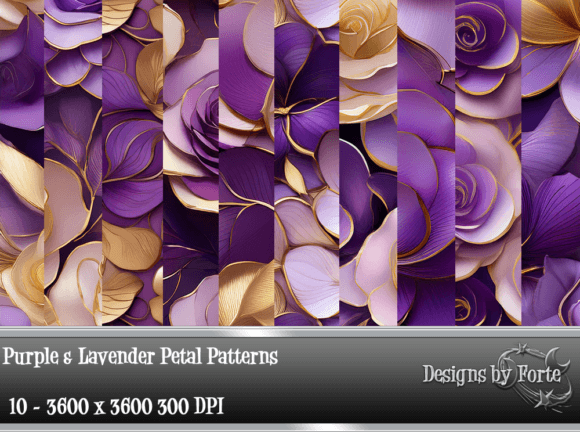
The Purple Lavender Petal Patterns are high-resolution design assets created using advanced artificial intelligence techniques. Each pattern measures 3600x3600 pixels at 300 dpi, ensuring crisp clarity and scalability for both print and digital use. The collection includes ten distinct designs, all centered around the soothing tones of purple and lavender, with petal-like motifs that evoke serenity and sophistication.
These patterns are not just decorative; they serve as functional components within broader design processes. Whether you're working on branding materials, event planning, or personal organization systems, these textures can be integrated to elevate your final output while maintaining professional quality and consistency.
Integrating Into Pre-Project Planning
Before diving into any creative endeavor, it’s essential to plan the visual direction carefully. Purple Lavender Petal Patterns can act as a foundation for your color scheme and theme development. By selecting one or more patterns early in the planning phase, you establish a cohesive look that aligns with the mood you want to convey—whether it's calmness for wellness content or whimsy for stationery collections.
- Brand Development: Use the patterns during brand identity workshops to inspire tone and style choices.
- Event Design: Choose a petal pattern to guide the visual language of invitations, backdrops, or signage.
- Product Packaging: Incorporate the texture into mockups or prototypes to visualize how it might enhance packaging design.
This early integration ensures that all subsequent design decisions flow naturally from a unified palette, streamlining the process and reducing revisions later on.
Utilizing During the Creative Process
Once your project is underway, the Purple Lavender Petal Patterns become valuable tools for execution. Their high resolution makes them suitable for detailed work, while their subtle variations allow for layering and blending without overwhelming the composition. Here are some practical use cases:
- Scrapbooking & Journaling: Add depth and interest by overlaying the petal textures onto backgrounds or photo frames.
- Card Design: Apply the patterns to greeting cards, thank-you notes, or custom wedding invites for a touch of luxury.
- Textile and Fabric Work: Use them as overlays in fabric design software to simulate floral prints or as background textures in digital embroidery projects.
- Photo Backgrounds: Enhance portrait photography or product shots with soft, elegant backdrops that complement the subject without distracting.
When working in Adobe Photoshop, Illustrator, or similar platforms, import the patterns into your library for quick access. This allows you to experiment with opacity, blending modes, and positioning to achieve the desired effect. For web-based tools like Canva or Crello, consider converting the textures into usable formats (such as PNG) and uploading them for seamless application.
Workflow Tip: Layer Management
To maintain control over your design, always keep the pattern layers separate from other elements. This enables easy adjustments or replacements without disrupting the rest of your layout. If you’re designing for print, ensure the file format supports CMYK color profiles and embed the textures properly to avoid compatibility issues.
Post-Creation Applications and Long-Term Use
After completing a project, these patterns can continue to provide value. They are excellent for creating templates, reusable assets, or even promotional materials that reflect the same aesthetic. For example:
- Reusable Templates: Build a scrapbook or card template once and reuse it for future projects by simply swapping out images or text.
- Sticker Designs: Cut out petal shapes and turn them into printable stickers for planners, packaging, or social media graphics.
- Print-on-Demand Products: Upload the patterns to platforms like Etsy or Redbubble to create custom calendars, mugs, or apparel with minimal effort.
By organizing your assets into folders based on use case—such as "event backgrounds," "textile overlays," or "card accents"—you make it easier to retrieve and repurpose them efficiently. This approach supports long-term creativity and helps reduce time spent sourcing new visuals for similar projects.
Compatibility and Usability Across Tools
The versatility of Purple Lavender Petal Patterns extends beyond their visual appeal. These AI-generated textures are compatible with most major design and publishing platforms, including but not limited to:
- Adobe Creative Suite (Photoshop, Illustrator, InDesign)
- Procreate and other digital art apps
- Canva, Figma, and other graphic design tools
- Word processors and presentation software like PowerPoint
For users who prefer non-digital methods, the patterns can also be printed at high quality for physical crafts, such as wrapping paper, wall art, or DIY planner embellishments. Always test the texture in a small section first when printing to ensure color accuracy and scale appropriately.
Implementation Example: Planner Layouts
Consider a scenario where you're designing a monthly planner. Start by importing a petal pattern as the base background. Next, apply a semi-transparent white layer to balance the colors and add legibility. Then, place your calendar grid, headings, and icons on top. Finally, insert additional petal textures as dividers between sections or as decorative flourishes around key dates.
This layered approach ensures flexibility and maintains a clean, professional appearance throughout the planner. You can save this setup as a template for future months, adjusting only the content and dates while retaining the consistent visual style.
Quality Control and Consistency
One of the biggest advantages of AI-generated textures is their ability to maintain a uniform look across multiple assets. When using Purple Lavender Petal Patterns, consistency is key. Stick to a selection of two or three patterns per project to avoid visual clutter and maintain professionalism.
Additionally, consider the following tips for quality control:
- Test Print: Before large-scale production, print a sample to evaluate how the pattern interacts with your chosen paper stock and ink.
- File Organization: Keep each pattern in its own folder and label them clearly according to size, use case, and modification history.
- Backup Assets: Store the original ZIP file in a secure location or cloud service to ensure you always have access to unmodified versions.
Observation: The Power of Subtlety
While the patterns are visually rich, their true strength lies in subtlety. Overusing intricate textures can lead to a busy, unprofessional look. Instead, focus on strategic placement—behind titles, under photos, or as accent borders. This technique highlights the pattern’s beauty without overshadowing the main content.
Enhancing Productivity and Creativity
Professionals and hobbyists alike often find themselves stuck in the early stages of a design project due to indecision about color schemes or background options. The Purple Lavender Petal Patterns can help overcome this block by offering pre-vetted, aesthetically pleasing choices. Their calming hues are particularly useful for productivity tools such as bullet journals, planners, or educational resources designed for mindfulness and focus.
Moreover, because these patterns are AI-generated, they eliminate the need for tedious hand-drawing or searching for royalty-free stock. This saves time and reduces the risk of copyright infringement, especially important for entrepreneurs and marketers who rely on fast turnaround times and legal compliance.
Use Case: Marketing Collateral
In marketing, visual consistency is vital. Suppose you're launching a new line of organic skincare products. Using the Purple Lavender Petal Patterns in your packaging, website headers, and social media posts creates an instant sense of harmony and nature-inspired quality. Pair them with minimalist typography and neutral accents for a balanced, modern feel.
Such thoughtful implementation not only strengthens your brand identity but also reinforces customer trust through visual coherence.
Storage and Accessibility for Teams
If you're part of a team or collaborate frequently, storing the Purple Lavender Petal Patterns in a shared drive or asset management platform can streamline workflows. Assign clear naming conventions and version numbers so everyone knows which pattern to use for specific tasks. For example:
PLPP_Background_01.psdPLPP_Accent_05.pngPLPP_Texture_Layer_03.ai
Include documentation in your shared space to explain the intended use of each pattern. This promotes efficient collaboration and minimizes errors caused by misinterpretation or misuse.
Conclusion: Elevating Your Output with Purpose
The Purple Lavender Petal Patterns offer a refined, adaptable solution for enhancing creative and professional outputs. From initial concept development to final execution and long-term reuse, these AI-generated textures support a smooth workflow that prioritizes both quality and efficiency. By integrating them thoughtfully into your design process, you can elevate your work with a touch of sophistication that resonates with your audience and reflects your attention to detail.
Whether you're a seasoned designer or just beginning to explore the world of digital textures, these patterns provide a reliable, beautiful resource that fits seamlessly into your toolkit. With proper preparation, smart layering, and strategic use, you can transform ordinary projects into extraordinary ones—all while staying grounded in practical, repeatable steps.